sgns

Text a sign

Noticed something? Text it to signs and it’s saved to your journal: a few words, a photo, a video, or a voice memo.

(234) 65-SIGNS

SMS consent

To receive texts from signs, you agree to this statement in the signs app. The box is never checked for you:

Message types: confirmations of signs you text in, and alerts when someone you’ve authorized adds a sign to your journal. Message frequency varies. Msg & data rates may apply. Reply HELP for help. Reply STOP to opt out at any time. See our Terms of Service and Privacy Policy.

How to sign up

Texting works for people who already have a signs journal, or who’ve been invited to one.

  1. Sign in to signs, tap Add a sign, then Text a sign.
  2. Check the box agreeing to receive texts from signs. It is never checked for you.
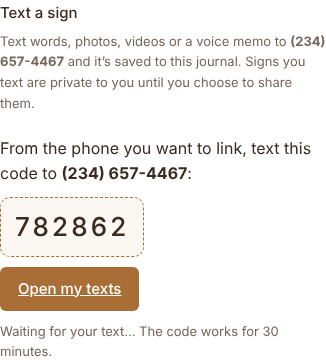
  3. Tap Link my phone. A 6-digit code appears.
  4. From your phone, text that code to (234) 65-SIGNS. signs replies to confirm your phone is linked.
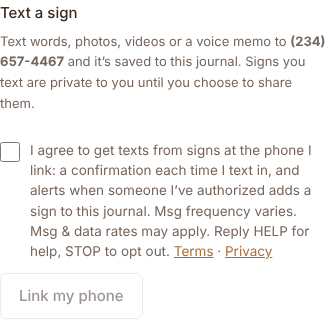
The Text a sign screen in the signs app, with an unchecked box reading: I agree to get texts from signs at the phone I link: a confirmation each time I text in, and alerts when someone I’ve authorized adds a sign to this journal. Msg frequency varies. Msg and data rates may apply. Reply HELP for help, STOP to opt out. Terms and Privacy links follow, then a Link my phone button.
The sign-up screen in the app. The button stays off until the box is checked.
After checking the box and tapping Link my phone, the app shows: From the phone you want to link, text this code to (234) 657-4467, a 6-digit code, an Open my texts button, and: Waiting for your text. The code works for 30 minutes.
After tapping Link my phone: the one-time code to text from your phone. signs then replies with the confirmation shown below.

What the texts look like

You
482913
signs
signs: Your phone is linked to [Name]’s journal. Text notes, photos, or voice memos anytime to save them. You’ll also get alerts when someone you’ve authorized adds a sign. Msg frequency varies. Msg & data rates may apply. Reply HELP for help, STOP to opt out.
You
Saw a cardinal on the porch rail this morning
signs
signs: Saved “Cardinal on the porch rail” to [Name]’s journal.
signs
signs: [Name] added a new sign to [Name]’s journal: “[Title]”. Open signs to see it. Reply STOP to opt out.

The fine print

Message frequency varies. Message and data rates may apply. Reply HELP for help and STOP to opt out at any time. Carriers are not liable for delayed or undelivered messages. You can also unlink your phone in the app under Add a sign → Text a sign. See our Terms and Privacy Policy.